
TL;DR
To work out the ROI of AI automation, cost one real process at your real wage rates. Then count only the hours that will truly disappear, subtract every cost (the build, the running costs, your own team’s time), and check the payback period. If the business case only works with 100% time savings from day one, it doesn’t work.
Somewhere in Australia right now, a business owner is looking at a slide. The slide has a line going up and to the right. There may be a rocket emoji.
The slide says automation will “save 30 hours a week”. Nobody in the room knows where the 30 came from. Nobody asks, because the chart looks very confident.
I’ll admit something uncool here: I love a spreadsheet. I have opinions about cell formatting. So nothing hurts me quite like a spreadsheet being used to dress up a guess.
This post is the boring, honest version of the ROI of AI automation. One process, real numbers, and a formula you can defend to your accountant.
Next step
Got a process you suspect is worth automating?
Bring one workflow. We’ll measure what it costs today, work out what would really go, and tell you honestly whether the numbers stack up.
On this page
- How do you calculate the ROI of AI automation?
- Why do most automation ROI numbers fall apart?
- Are hours saved the same as dollars saved?
- What does an honest worked example look like?
- What should you count for each kind of step?
- Which mistakes make automation savings look bigger than they are?
- When should you not automate a process?
- What does a defensible business case look like?
- Frequently asked questions
How do you calculate the ROI of AI automation?
You calculate the ROI of AI automation by comparing what one process costs today with what it will cost after automation, including everything you pay to get there. Annual net benefit is the value of the work removed, minus running costs. Divide the upfront cost by the monthly net benefit to get the payback period.
- Annual net benefitThe value of the hours and errors removed, minus yearly running costs.Step 1
- ROIAnnual net benefit divided by the total upfront cost.Step 2
- Payback periodTotal upfront cost divided by the monthly net benefit.Step 3
The formula is the easy part. The inputs are where the fantasy creeps in.
Why do most automation ROI numbers fall apart?
Most automation ROI numbers fall apart because they count every hour, every week, from day one, at no running cost. Real projects have exceptions, leave, a build period and subscriptions. The gap between feeling faster and seeing profit is usually a counting problem.
Australian businesses are not short on AI enthusiasm. The National AI Centre’s tracker found 43% of Australian SMEs reported some level of AI adoption between December 2025 and February 2026.
The returns are a different story. When the Reserve Bank surveyed more than 100 medium and large firms, it reported that returns on investment had been mixed to date, and that few firms reported material productivity gains from AI so far.
NAB’s 2026 SME research shows the same gap. Asked which areas of the business had benefited most from AI, 58% named productivity, but only 9% named profitability.
43%Australian SMEs reporting some AI adoption (National AI Centre)
58%SMEs naming productivity as an area that benefited most from AI (NAB)
9%SMEs naming profitability (NAB)
Read that again. Lots of people feel faster. Very few can find it in the P&L.
The five fantasy numbers
These are the usual suspects. Most rocket slides contain at least three.
- 100% of the hours. No process disappears completely. Someone still handles the odd ones and checks the output.
- 52 weeks a year. Your staff take leave. Count the weeks the work is done, not the weeks in a calendar.
- Savings from day one. There is a build, a test period and a few weeks of everyone double-checking. Year one is never a full year.
- Free running costs. Software has subscriptions. Workflows need maintenance when a supplier changes their invoice layout (and they will).
- Hours counted as cash. This one deserves its own section.
Are hours saved the same as dollars saved?
Hours saved are not the same as dollars saved, because hours only become dollars when they change what you spend or earn. That happens when you avoid a hire or overtime, move the time to work that earns revenue, or stop paying for mistakes. Otherwise the benefit is capacity, not cash.
If automation gives Priya back ten hours a week, your wages bill does not drop by ten hours. Priya still works full time. You still pay her.
So where does the money show up? Only in one of three places:
- Cost you avoid. You were about to hire, pay overtime or bring in a temp, and now you don’t need to.
- Work that earns. Those hours move to billable work, sales follow-up or jobs you were turning away.
- Mistakes you stop paying for. Fewer duplicate payments, less rework, fewer late fees.
The honest version: if you can’t point to one of those three, you have a real benefit, but it is capacity. Put it in the business case as capacity. Your accountant will respect you for it.
What does an honest worked example look like?
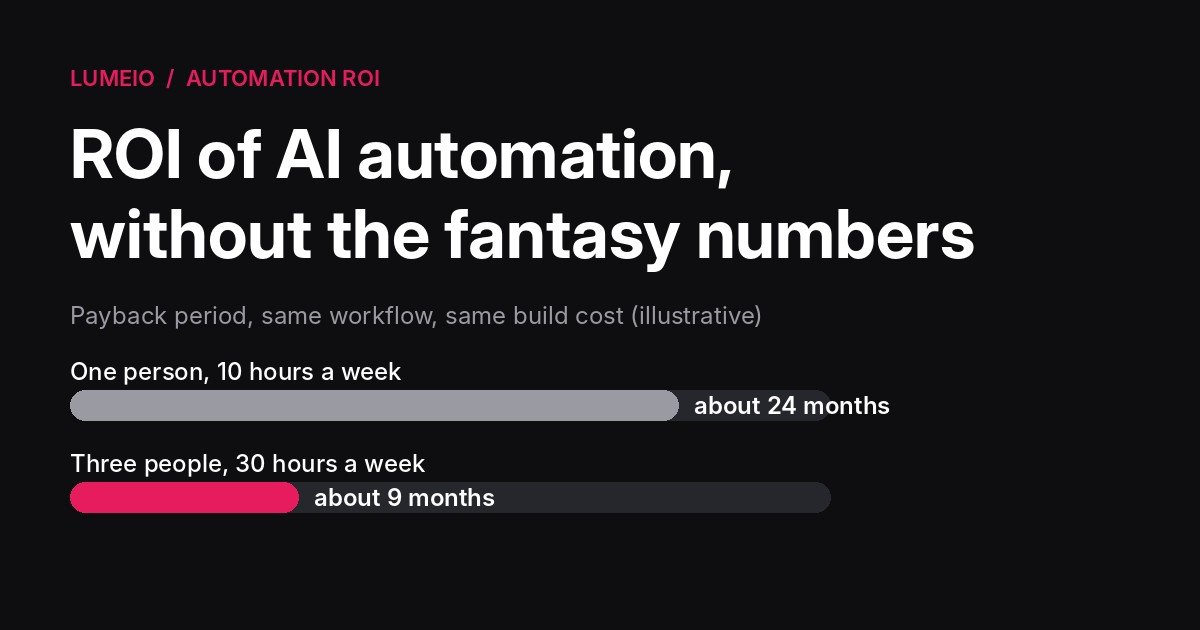
An honest worked example costs one process at a real hourly rate, removes only the share of work that will actually go, and includes every cost. In the illustration below, the same build pays back in about 24 months for one person and about 9 months for three.
The numbers below are an illustration, not a client result. Swap in your own.
The process: an accounts person retypes supplier invoices from email into the accounting system. It takes about 10 hours a week.
Step 1: Find the real hourly cost
Say the salary is $80,000. Super is 12% of ordinary time earnings from 1 July 2025, which makes $89,600.
Divide by 1,976 paid hours (38 hours a week for 52 weeks) and you get about $45 an hour.
That’s deliberately low. It leaves out payroll tax, workers compensation, the desk and the software licence. Conservative numbers are easier to defend.
For context, the ABS put full-time adult average weekly ordinary time earnings at $2,083.70 in May 2026. Use your actual wage, not the average.
Step 2: Cost the process as it runs today
10 hours a week for 46 working weeks is 460 hours a year. At $45.34 an hour, that’s about $20,860 a year.
Step 3: Count only what will actually go
Some invoices will always need a person. The supplier is new, the total doesn’t match the purchase order, or the PDF looks like it was faxed through a hedge.
Assume 70% of the work can go. That’s 322 hours, worth about $14,600 a year.
Step 4: Add up every cost
For this illustration, assume:
- Build and setup: $18,000
- Your team’s time to test and learn it: 30 hours, about $1,360
- Running costs: $300 a month, or $3,600 a year
Upfront cost: $19,360. These are placeholder figures, not a price list. Use your actual quote. No quote yet? Our guide to what an AI consultant costs in Melbourne has 2026 price ranges to sanity-check one.
Step 5: Run the payback period
Net benefit once it’s running is $14,600 less $3,600, so $11,000 a year, or about $917 a month.
$19,360 divided by $917 is 21 months. Add roughly three months to build and bed in, and the payback period is about two years.
[Switches to serious face] That is not a rocket. That is a “maybe”.
Now change one input
Same process, but three people each do it for 10 hours a week. In this example the build cost stays the same, because it’s the same workflow.
| One person | Three people | |
|---|---|---|
| Hours a week today | 10 | 30 |
| Hours removed a year (70%) | 322 | 966 |
| Annual value of those hours | $14,600 | $43,800 |
| Annual running cost | $3,600 | $3,600 |
| Upfront cost | $19,360 | $19,360 |
| Payback period | About 24 months | About 9 months |
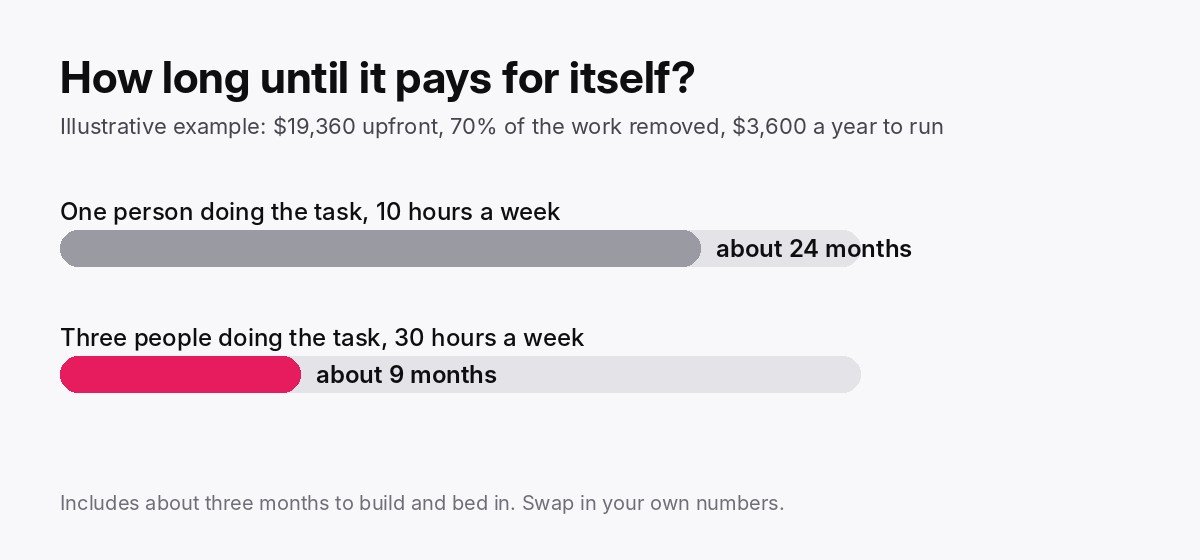
Same technology. Same vendor. Completely different answer.
This is the most useful thing an honest automation ROI calculation gives you: permission to say no to the small stuff, and a clear reason to say yes to the right process.
Want the payback period on your own process? Bring one workflow and how many people do it. We’ll run the numbers with you and tell you honestly whether it’s a yes, a not yet or a no.
What should you count for each kind of step?
When you estimate automation savings, count nearly all the time for rule-based steps, most of the time for AI steps (less the minutes a person spends reviewing), and nothing for steps that need human judgement. Splitting a workflow this way stops the savings being overstated.
| Type of step | Example | What to count |
|---|---|---|
| Rule-based automation | Moving data between systems, scheduled reports, reminders | Nearly all of the time, once tested |
| AI | Reading an invoice, sorting an email, summarising a document | Most of the time, less the minutes a person spends reviewing it |
| Human judgement | Approvals, exceptions, anything a client would ring you about | Nothing. Leave it in the cost column |
If a quote assumes AI will handle approvals and exceptions unsupervised, the savings are overstated. So is the appetite for risk.
We wrote about where that line sits in human in the loop, defined properly.
Which mistakes make automation savings look bigger than they are?
Four mistakes wreck most automation business cases: automating a process that is already broken, choosing the tool before the problem, ignoring how often the work happens, and never timing the process before the change. Each one inflates the expected saving, or makes the real saving impossible to prove.
Automating a broken process. If the workflow is a mess, you’ll get a faster mess. Fix the steps first, then cost it.
Starting with the tool. “We bought an AI subscription, now what?” is a business case written backwards.
Ignoring volume. As the table shows, a process done by one person rarely pays as well as the same process done by five.
Skipping the baseline. If nobody timed the process before, nobody can prove the saving after. Time it for two weeks first.
Not sure what the process costs today? Start with the hidden cost of manual data entry. For a full teardown of one workflow, see our Automation Autopsy of a $45,000 Excel report.
The invoice example above is close to what we cover in how to automate invoice processing in Xero.
When should you not automate a process?
You should not automate a process when the honest numbers don’t pay back. That usually means the work is low volume, changes every month, needs judgement on almost every item, or can be fixed more cheaply another way. Doing nothing is a legitimate option, and sometimes the best one.
This is the part the rocket slide always skips. It’s also the part that can save you the most money.
Here are the signs the answer is “not yet” or “not this one”:
- It happens once a month. A task that takes two hours every month end is 24 hours a year. Very few builds pay back on that.
- The process keeps changing. If the steps were different last quarter and will be different next quarter, you’ll pay to rebuild the automation every time.
- Every item needs a judgement call. If a person has to think about each one, there isn’t much left for software to take.
- A cheaper fix exists. A shared template, a feature in software you already pay for, or asking suppliers to send invoices to one inbox.
- The payback runs past 24 months on conservative numbers, and nothing else (risk, growth, a hire you’d avoid) changes the picture.
Sometimes the cheapest automation is deleting the step altogether. Nobody has ever needed a robot to produce a report that nobody reads.
If you run an accounting or bookkeeping practice, see where the maths tends to work out in AI automation for accounting firms.
What does a defensible business case look like?
A defensible automation business case fits on one page. It names one process, shows a measured baseline, removes a realistic share of the work, lists every cost and states a payback period with its assumptions written down. It also says what kind of benefit you expect: cash or capacity.
- One named processWho does it, and how often.Scope
- A measured baselineIn hours, and in dollars at your real rate.Today
- A realistic share removedWith the exceptions left in.Benefit
- Every costIncluding your own team’s time.Cost
- A payback periodWith the assumptions written down.Result
- The type of benefitCost avoided, work that earns, or capacity.Honesty
Lumeio’s recommendation
Cost one process. Count what really goes. Then check the payback period.
If it only works on the rocket slide, it doesn’t work.
As a rule of thumb, a payback period under 12 months on conservative numbers is worth a serious look. Over 24 months, you need a reason beyond the hours.
This is the work Lumeio does before anything gets built. We start with how the work actually gets done, measure it, and separate what should be automated from what should stay with a person.
Sometimes the answer is “this one pays for itself in months”. Sometimes it’s “not this process, try that one”. Both are useful answers. [Neither involves a rocket.]
Next step
Want the numbers run on your own process?
Show us one workflow and how it gets done today. We’ll cost it properly, flag what should stay human, and give you a payback period you can defend.
Frequently asked questions
What is a good ROI for AI automation?
A good ROI for AI automation has no universal benchmark, so judge it by how quickly it pays for itself. If a process pays back its full cost in under 12 months on conservative assumptions, it is usually a strong candidate. Longer than 24 months deserves a hard second look before you commit.
How do I calculate the payback period for automation?
To calculate the payback period for automation, divide the total upfront cost by the monthly net benefit. The upfront cost includes the build and your team’s time. The monthly net benefit is the value of the work removed, minus monthly running costs. Then add the months it takes to build and bed in.
Should I count time saved as money saved?
Time saved should only count as money saved when it changes what you spend or earn. That happens when it avoids a hire or overtime, moves to work that earns revenue, or prevents costly errors. Otherwise, record it in the business case as capacity returned to the team, not as cash.
What costs do people forget in an automation business case?
The costs people most often forget in an automation business case are internal staff time for testing and training, ongoing subscriptions, and maintenance when a system or document format changes. The other one is the weeks of reduced benefit while the new workflow beds in and everyone double-checks it.
Is AI automation worth it for a small business?
Whether AI automation is worth it for a small business depends on volume more than size. A small team with one high-volume, repetitive process can pay back faster than a large business automating a task done once a month. Cost that single process honestly before deciding.