
Document intelligence · Melbourne
Intelligent document processing for paperwork that gets audited
Lumeio’s document intelligence reads the dockets, permits, certificates and forms your team retypes, checks every value against your rules, and sends anything doubtful to a person. You get a register you can defend, and someone gets their Friday afternoon back.
Fixed price A$1,950 + GST. Written report in 5 business days. Credited if you go ahead.
Book your Pain Point Audit
No obligation. We reply within 1 business day. Your details stay private. See the privacy policy.
Document intelligence, also called intelligent document processing, uses AI to read PDFs, scans, photos and forms and turn them into structured data. Lumeio builds it for regulated, document-heavy work in Melbourne and across Australia: rules check every extracted value, each value links back to its source page, and anything that fails a check goes to a named person instead of into your register.
The symptoms
Signs your business is retyping documents it should be reading automatically
Nobody plans to become a human photocopier. It happens one PDF at a time. If two or more of these sound familiar, you have a document problem, not a staffing problem.
- Someone types numbers from PDFs, dockets or phone photos into a spreadsheet, and someone else checks their typing.
- The spreadsheet is called something like REGISTER_v7_FINAL_actual.xlsx, and only one person trusts it.
- When an auditor asks where a number came from, the answer starts with “give me a minute” and ends in an inbox search.
- Certificates expire and nobody notices until the document is needed, because the expiry date lives inside a PDF.
- The same field gets written three different ways by three different people, and the monthly report quietly averages the confusion.
[Switches to serious face] None of this is a competence problem. It is a volume problem, and volume is the part software is good at.
Definition
What is intelligent document processing?
Intelligent document processing (IDP), sometimes called document AI, is software that reads a document the way a careful person would: it works out what kind of document it is, finds the fields that matter, and checks whether the values make sense. Lumeio calls the version it builds document intelligence, because for regulated work the reading is only half the job. The other half is proving the data is right.
Plain OCR (optical character recognition) is one step inside that. OCR turns a picture of text into text. It has no idea that 14.2 is a tonnage, that the date is in the wrong format, or that the certificate expired in March.
| Question | OCR on its own | Lumeio document intelligence |
|---|---|---|
| What comes out? | A block of text | Named, typed fields in a register |
| Knows which number is which? | No | Yes, per document type |
| Checks the value is right? | No | Yes, against your rules |
| Can you trace a value to its page? | Rarely | Always |
| What happens when it’s unsure? | Nothing. The error flows on | It goes to a named person |
For the longer comparison, read document AI vs OCR.
How it works
How intelligent document processing works at Lumeio
Five steps. Each one names who does the work: fixed rules, AI or a person. And each one says what goes wrong if it’s skipped, because that’s where most document projects come unstuck.
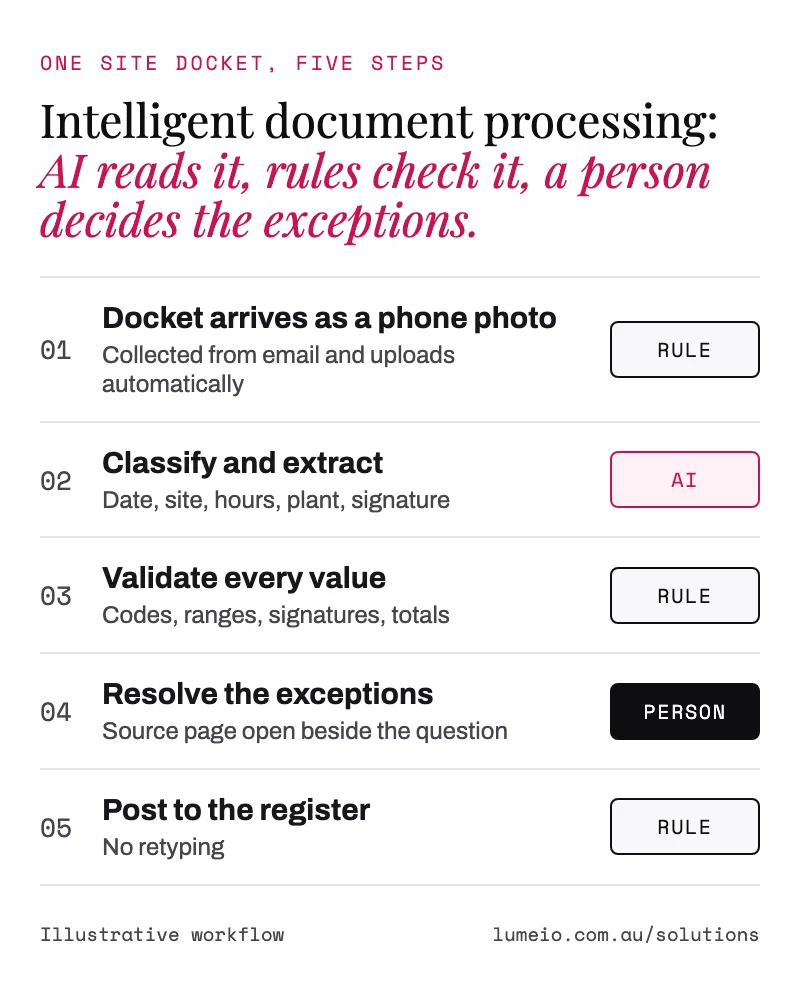
Ingest Rules
Documents land in one place however they arrive: email attachments, scans, uploads, phone photos sent at 6am.
If skipped: documents stay scattered across five inboxes and a shared drive.
Classify and extract AI
AI identifies the document type and reads each field into a named value, keeping a pointer to the page it came from.
If skipped: you get text, not data, and someone still retypes it.
Validate Rules
Every value is checked against your rules: permitted codes, expected ranges, required signatures, expiry dates, matching totals.
If skipped: AI errors reach your register looking exactly as confident as correct values.
Route exceptions Person
Anything that fails a rule goes to a named person, with the source page open beside the question. Their decision is recorded.
If skipped: either nobody checks anything or everybody re-checks everything.
Export Rules
Clean records post into the register, spreadsheet or system you already use, in the shape your reporting expects.
If skipped: a beautiful new database that nobody opens twice.
Rules, AI or a person
What we automate, where AI helps, and what stays human
AI is the right tool for reading messy documents. It’s the wrong tool for checking its own work, and it should never be the one signing off. So each job goes to the cheapest tool that can do it reliably.
Ordinary automation Rules
Predictable, cheap and testable.
- Collecting documents from inboxes and folders
- Checking codes, ranges, dates and totals
- Spotting duplicates and expired certificates
- Exporting to your systems on a schedule
AI AI
Only where the input is unstructured.
- Working out what kind of document it is
- Reading fields from scans, photos and varied layouts
- Normalising the same thing written three ways
- Summarising long documents for a reviewer
A person Person
Judgement and accountability.
- Every exception the rules can’t confirm
- Sign-off on records sent to a regulator or client
- Professional decisions, such as issuing a permit
- Changing the rules themselves
This isn’t just caution. In the National AI Centre’s adoption survey, about 65% of Australian businesses not yet using AI said they distrust AI decision-making or want to keep human control of their processes (NAIC, first published May 2026). Good. So do we. Here’s what proper human oversight looks like.
Where we use it
Documents we read in five regulated industries
Different regulators, different paperwork, the same build underneath.
Worked example
Before and after: a weekly docket register
An illustrative example with round numbers, not a client result. A yard receives 400 dockets a week as PDFs and phone photos. Someone types each one into the register in about 3 minutes, including the squinting.
| Before | After | |
|---|---|---|
| Who reads each docket | A person, every one | AI reads; rules check |
| Dockets a person handles | 400 a week | About 40 exceptions (assumes 1 in 10 fails a rule) |
| Time spent | About 20 hours a week | About 2 hours a week |
| “Where did this number come from?” | Inbox search | One click to the source page |
| Wrong waste code typed in | Found at audit, maybe | Stopped at validation |
| Who signs off | Whoever had time | A named reviewer, timestamped |
At $45 an hour (the conservative rate from our ROI of automation guide) and 46 working weeks, those 18 hours a week are worth about $37,000 a year. That’s a best case: dockets are consistent, typed documents, so 1 in 10 exceptions is plausible. Mixed or handwritten documents produce more, which is why the estimator below assumes a more cautious 70%. Your exception rate is what moves that number most, which is why the audit measures it from your own documents before anyone quotes you a build.
Estimator
What is retyping documents costing you?
Three numbers, ten seconds. Nothing you enter is sent to us or stored.
Enter a number above zero in all three boxes.
Your indicative opportunity
- Hours a year on the work today
- Cost of those hours a year
- Indicative value if 70% goes
Estimated from the information you provide, over 46 working weeks, assuming 70% of the handling can be removed (the same assumption as our ROI guide). It is an indicative opportunity, not a quote or a guaranteed saving. Actual results depend on your documents, your exception rate and the build. Want it measured properly? That’s what the audit does.
Deliverables
What a document intelligence build gives you
The same six things in every build, whatever the documents.
A structured register
Queryable data, not a folder of PDFs. Filter by site, supplier, date or anything else you extract.
A validation trail
Which rule checked which field, and whether it passed. Rule by rule, per field.
Source linking
Every value links back to the page it came from, so “where did this come from?” takes one click.
An exception queue
Failures go to a named person with the document beside the question. Review effort goes where the risk is.
Reviewer sign-off
Who approved what, and when. Named and timestamped, the way an auditor likes it.
Export into your systems
Into the spreadsheet, register, accounting or job system you already run. Plus the rule set and handover notes.
Data handling
Where your documents and data go
Before anything is built, the audit report sets out where your documents and extracted data would be stored, which models would read them and who can see the register. You approve that in writing. No surprises in the build.
If your documents hold personal information about customers, residents, staff or applicants, the audit also checks whether the Privacy Act’s new automated decision-making rule applies from 10 December 2026. Check your ADM exposure.
Honest bit
Common intelligent document processing mistakes
- Trusting extraction without validation. AI reads a smudged 7 as a 1 with total confidence. Without a rule behind it, nobody finds out until the audit.
- Starting with the hardest document. Handwritten, twelve layouts, rare. Start with the high-volume, consistent document and prove it there first.
- Buying a tool before mapping the process. If nobody can say what “correct” looks like for a field, software can’t check it either.
- Re-checking everything anyway. If the team still reviews all 400 dockets, you’ve bought an expensive second opinion. Exceptions only, or the hours don’t come back.
- Leaving out the export. Data that never reaches the system people use is just a nicer-looking pile.
When document intelligence is the wrong fix
We’d rather tell you now. Skip it if you handle a few dozen documents a month, because the build won’t pay back. Skip it if the data already exists in a system as a clean export or API, because reading a PDF of it is the long way round; that’s workflow automation. And if the real problem is that nobody agrees what the process should be, the audit will say so before you spend anything on a build.
Price
What document intelligence costs
A$1,950+ GST
Start with the fixed-price Pain Point Audit. A half-day walkthrough of your documents and process, and a written report within 5 business days. It ranks what to automate and gives a fixed price for the first build.
The build is quoted at a fixed price per phase. What moves the price: how many document types, how many rules, how messy the inputs are and which systems the data goes into.
The audit fee is credited in full against a first build of A$5,000 + GST or more signed within 60 days.
The report is yours to keep, whether or not you go ahead.
Who builds it
FAQ
Questions about document intelligence
What is intelligent document processing?
Intelligent document processing (IDP) uses AI to read documents such as PDFs, scans, phone photos and forms, pull out the fields you need and check each one against your rules before it reaches a register or system. Lumeio calls its version document intelligence. Every value stays linked to the page it came from, and anything that fails a check goes to a named person.
How is document intelligence different from OCR?
OCR turns an image of text into text. It does not know which number is the tonnage and which is the docket number, and it cannot tell you the value is wrong. Document intelligence uses OCR as one step, then identifies each field, checks it against your rules and sends anything doubtful to a person.
What documents can it read?
Most documents a team retypes today: PDFs, scanned forms, phone photos, email attachments and spreadsheets sent as files. Typical examples are weighbridge dockets, waste transport certificates, permit applications, structural certificates, subcontractor insurance certificates, invoices and care records. Handwriting and poor photos can be read, but they produce more exceptions for a person to check.
Does a person still check the data?
Yes, where it matters. Values that pass every rule go straight to the register. Values that fail a rule, or that the system is not confident about, go to a named person with the source page open beside the question. Sign-off on records that go to a regulator or client stays with your team.
How accurate is it?
It depends on your documents, so Lumeio does not quote a single accuracy figure. Clean, typed PDFs extract very reliably. Blurry photos and handwriting do not. The design assumes some values will be wrong, which is why every field is checked against a rule and failures go to a person instead of into the register.
How much does document intelligence cost?
Every project starts with a Pain Point Audit at a fixed A$1,950 + GST. The audit report includes a fixed price for the first build, which depends on the number of document types, the number of rules and the systems the data goes into. The audit fee is credited in full against a first build of A$5,000 + GST or more signed within 60 days.
Where is our data stored?
That is agreed before anything is built. The audit report states where your documents and extracted data would be stored, which models would read them and who can see the register, and you approve it first. If the documents hold personal information, the audit also checks whether the new APP 1.7 automated decision-making rule applies.
Do we have to replace our current systems?
No. The output is exported into the systems you already use, such as a spreadsheet, your accounting or job management system, or a compliance register. Document intelligence replaces the retyping, not the software.
Find out which documents are worth automating first
One half-day audit. A written report in 5 business days. A fixed price for the first build. Friday afternoons optional.
- All solutions
- Pain Point Audit
- Workflow automation
- AI decision systems
- The hidden cost of manual data entry
- Building surveyor paperwork
- General environmental duty records
Sources
- National AI Centre: AI adoption insights, December 2025 to February 2026
- ABS: Average Weekly Earnings, Australia (context for the hourly cost default)
- Lumeio: how to calculate the ROI of AI automation (the $45 hourly rate, 46 working weeks and 70% assumptions)